|
Category:
Video Tools
|

|
|
Date:
7/10/2006
|
|
Author:
Stefano Bennati
|
|
Publisher:
3dfxzone.it
|

 3D-Analyze: what's it? 3D-Analyze: what's it?
3DAnalyze is a powerful application that allows to play many DirectX based games using video hardware officially unsupported and theoretically unable to run these; in this guide I'will show you how to install and configure 3D-Analyze main settings, depending on the title you want to play.
First let me explain link among video cards generations and supported Microsoft DirectX versions. This point is crucial for us because changing DirectX versions also hardware compatibilty requests change.
 DirectX 5.0 and 6.0 Compliant Cards DirectX 5.0 and 6.0 Compliant Cards
This category contains video cards made from 1995 to 1999. For example all 3dfx cards, most video cards from Intel, SiS and S3 Graphics.
DirectX 7.0 Compliant Cards
This category includes video cards made from 1999 to 2001. Main features of this generation are: hardware units for Transform and Lightning (T&L) computation, and Bump Mapping support. For example you can think to Radeon 7000, GeForce, GeForce 2, and GeForce 4 MX cards.
DirectX 8.0 Compliant Cards
This category contains graphics controllers made from 2001 to 2003: these have hardware support for pixel and vertex shader up to version 1.3. Ex. GeForce 3, and GeForce 4.
DirectX 8.1 Compliant Cards
This category includes some video cards, mainly by ATI, made from 2001 to 2003 and with hardware support for pixel and vertex shader up to version 1.4. For example Radeon 8500, Radeon 9000, Radeon 9150, Radeon 9250, and XGI volari v3 belong to this set.
DirectX 9 Compliant Cards
This category contains video cards made since 2003. Main features of this generation are: hardware units for pixel and vertex shader up to version 2.0. For example you can think to Radeon 9x00, Radeon Xx00, Radeon X1x00, GeForce 5x00, GeForce 6x00, GeForce 7x00, and XGI Volari V5/V8.
3D-Analyze Setup
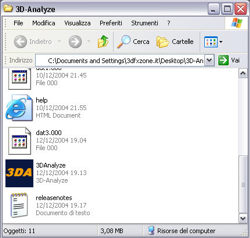
After downloading 3D-Analyze in archive
format - you can grab latest release here
- you must unpack it in a folder and then do a double
click on 3DAnalyze.exe file icon (see following
image) to launch it.
In the next page we will get the standard 3D-Analyze configuration.
|


![[Notice] Forum Boards Reorganization: Enhanced Accessibility and Feedback](/public/files/main_mess_link_area.gif)




![[High Resolution Image]](/images/?h=1&object=3D-Analyze_1.jpg)